Comic book templates.
Thirty-five comic templates as print-ready PDFs — blank grids, dynamic layouts, covers, character sheets, speech bubbles, four coloured genre pages and eight black-and-white action pages. Letter and A4. No account.
Last reviewed .
By the TaleAtelier Editorial Team
Pick a layout, pick your paper size, print at 100% scale (not “fit to page” — that rescales the panels).
Comic strips


3-panel strip
Two strips per sheet. The newspaper standard — Peanuts and Calvin & Hobbes ran on it.

4-panel strip
Two strips per sheet. The 4-koma shape: setup, development, turn, payoff.

4-koma vertical strip
Two Japanese yonkoma strips per sheet — four equal panels, read downward.
Comic pages

6-panel page
2x3 grid. The standard Western comic page — Image and IDW submissions use it.


9-panel grid
3x3. The Watchmen grid (Moore + Gibbons, 1986) — uniform rhythm, no hierarchy.

Splash page
One full-page frame at 6.625x10.25in trim. For the beat that earns a whole page.
Classroom — story beats printed in

3-panel — story beats
SETUP · CONFLICT · PUNCHLINE printed faintly inside the panels.

6-panel — story beats
OPENING · SETUP · RISING · TURN · CLIMAX · RESOLUTION, printed faintly in each panel.
Dynamic layouts

Diagonal action page
Slanted gutters cutting across the page — the layout action scenes use.

Inset panels
Small panels sitting on top of larger ones, for a close-up without spending a slot.


Tilted frames
Every panel a few degrees off true — for panic, dreams, disorientation.

Tall vertical panels
Narrow columns of uneven width — a fall, a tower, a long silence.
Manga and webtoon

Vertical scroll planner
Stacked beats with notes rules — rough a webtoon scroll before building it.

Manga page (right-to-left)
Irregular panels, numbered right-to-left — the order manga is read in.
Planning and reference


Character reference sheet
Front, side and back views, five expressions, and a notes column.

Fold-and-cut mini comic
One sheet becomes an 8-page booklet. Page numbers follow the fold.

Speech bubbles

Speech bubbles 2
Nine more — linked pair, heart, icy, sleep, wobble, burst, scroll caption.

Speech bubbles 1
Fourteen pop-art bubbles, all empty — cut one out, paste it on your drawing, write in it.
Coloured genre pages — borders in colour, panels still blank
The colour is in the background, gutters and corner motifs; every panel is left white, so these print as a finished-looking page you can still draw in.

Romance — in colour
Blush background, rose borders, cherry blossoms and hearts in the margins.

Comedy — in colour
Sunshine yellow, bold black borders with orange shadow, confetti gutters.


Fantasy — in colour
Deep teal with an antique gold frame — vines, crescent moon, stars.
Action pages — effects already drawn
These eight are not blank. Speed lines, screentone and impact bursts are already on the page, with the panel centres left open and every speech bubble empty. For colouring in, or for dropping your own art over the effects.


Impact burst — b&w
A jagged explosion filling the centre panel, focus lines radiating out.

Screentone grid — b&w
Six panels, a different classic screentone in each — centres left clear.


Manga effects — b&w
Irregular panels reading right to left, speed lines and screentone.


All thirty-five are free to print, copy and use in a classroom — no attribution required. Letter is 8.5×11″, A4 is 210×297mm; printing one on the other at “fit to page” shrinks the panels by about 6%.
A comic template is a blank page with the panel borders already drawn, so you can start on the story instead of ruling boxes. The thirty-five above cover 2 to 9 panels, right-to-left manga, a splash page, a storyboard planner and a sheet of speech-bubble shapes — each in US Letter and A4. Industry trim for a printed comic is 6.625×10.25 inches; Letter and A4 are the home-printer sizes. If you would rather have the panels filled than draw them, the AI-fill section further down covers that.
Which template path do you need?
Three paths cover almost everyone. Pick by your skill set and the output you actually want.
1. Print-and-draw
Best for: Kids, classroom activities, sketching by hand, brainstorming.
Where: The thirty-five PDFs at the top of this page — 2 to 9 panels, manga, splash, storyboard and speech bubbles, each in Letter and A4.
Output: Printed paper with empty panels; user draws inside.
2. Customize digitally
Best for: Marketers, social media, anyone with stock illustrations or existing art they want to drop into panels.
Tools: Canva (50+ comic strip templates, drag-drop, free + Pro $15/mo), Adobe Express ($9.99/mo Premium), Edit.org online editor.
Output: Digital file (PNG, PDF) with user-supplied images dropped into panels.
3. AI-fill the template
Best for: Story writers without drawing skills, creators wanting full panel art generated to match a brief.
Tools: TaleAtelier (Short/Medium/Long/Custom tiers, plans from $9.99/mo). Alternatives: Canva AI Comic Generator (free with Magic Studio credits), Dashtoon Studio (freemium).
Output: Complete comic with AI-generated panel art, characters, and dialogue placed in template structure.
Panel count and page sizing reference
A standard comic book page is 6.625×10.25 inches trimmed (with art to a 6.875×10.5-inch bleed), and a home-printed page is US Letter 8.5×11 inches or A4 210×297mm. Manga uses three sizes at three stages: you draw on B4, the magazine prints B5, and the collected tankōbon volume prints B6. Full table below.
| Format | Dimensions | When to use |
|---|---|---|
| Comic book industry trim | 6.625 × 10.25 inches | Standard submission size for Image Comics, IDW, indie publishers. Includes bleed area. |
| US Letter | 8.5 × 11 inches | Most printable PDF templates use this — fits any home or office printer. |
| A4 (ISO 216) | 210 × 297 mm (8.27 × 11.69 inches) | International standard outside North America. |
| Japanese B4 | 257 × 364 mm (10.12 × 14.33 inches) | Manga manuscript paper — what you draw on. One size up from the magazine trim, because line art drawn at final size loses detail when printed. |
| Japanese B5 | 182 × 257 mm (7.17 × 10.12 inches) | Japanese manga magazine / serialization trim — the size a chapter prints at. |
| Japanese B6 | 128 × 182 mm (5.04 × 7.17 inches) | Standard tankōbon volume size — the collected book a reader buys. |
| Instagram square | 1080 × 1080 px | Per-panel tile for carousel posts; 4–6 panels = swipe-through strip. |
| WEBTOON Canvas vertical | 800 px wide × variable height | Vertical-scroll mobile format. Episodes 30–50 panels tall. |
Manga panel templates and page templates
Manga templates differ from Western comic templates in three ways: they use irregular panel shapes (diagonal cuts, overlapping panels, dynamic size hierarchy), they follow right-to-left reading order, and they use the Japanese B-series rather than industry trim — drawn on B4 (257×364mm), printed at B5 in a magazine and B6 in a collected volume. How to make a manga covers the manuscript setup, including the 180×270mm inner frame that essential art has to stay inside.
Manga panel template. Variable-shape panel layouts on a single page. Common arrangements: splash + tier of thin panels, diagonal cuts for action beats, overlapping frames for emotional weight. Dad's Worksheets has free manga-variant PDFs; Canva has a manga template collection (some free, some Pro).
Manga page template. A full manuscript page, drawn at B4 and printed down to B5 or B6. If you are printing at home, A4 is the closer stand-in: its proportion (1:1.414) effectively matches the whole B-series (1:1.41–1:1.42), so a B-series layout fills it. US Letter is squarer at 1:1.29 — a B-format page fitted to Letter's width runs about an inch past the bottom of the sheet. Either way, print at 100% scale rather than scale-to-fit, since scaling silently changes every measurement on the page. RTL reading order — first panel top-right, last bottom-left. Speech bubbles positioned accordingly.
Manga cover template. Chapter opener or volume cover format. Full-page splash with title placement. Etsy has commercial manga cover template packs; free options are limited.
For AI-generated manga specifically, see our AI manga generator — the tool handles RTL panel flow, screentones, and manga panel framing automatically. For the manga aesthetic deep dive (screentones, ink density, panel rhythm), see our manga style guide.
Formats these templates don't cover
The sheets above are single-page print layouts. Four adjacent formats work differently enough to need their own tools.
Graphic novels. Book-length work — 60 to 200 pages — needs pagination, chapter breaks and consistent running heads, which is a layout program's job rather than a printable sheet's. Adobe InDesign and Affinity Publisher both handle it. The 6- and 9-panel sheets above are still the right shape for drafting individual pages.
Webtoons. Vertical-scroll episodes are 800px wide and thousands of pixels tall, stacked from 800×1280 sections — a shape that does not exist on paper, so there is no printable equivalent. Our AI webtoon maker outputs that format directly.
Covers. A cover is a single composed image — title placement, focal character, logo space — not a panel grid. The splash page above is the closest printable starting point; for a designed cover with type, Canva's editor is the faster route.
Scripts. Script templates are for writing before drawing — panel-by-panel description, dialogue, SFX cues. The storyboard planner above pairs small panels with ruled lines for exactly this: a sketch of the shot on the left, the dialogue and action beside it.
Templates for specific software
Canva comic templates. 50+ free comic strip templates in Canva's free tier, plus premium templates in Canva Pro. Drag-drop editable in-browser. The most accessible option for non-designers.
Procreate comic templates. iPad-only. Procreate itself doesn't ship comic templates, but the community shares free and paid template files (.procreate format) on Gumroad, Etsy, and creator sites.
Clip Studio Paint templates. Industry standard for professional comic and manga work. Ships with built-in webtoon, manga, and Western comic templates. Clip Studio Paint EX (subscription plans visible from $0.99/month entry-tier on clipstudio.net — verify current EX-tier pricing before subscribing).
Photoshop and Illustrator templates. PSD comic templates available from Adobe Stock (~$9.99/mo or single purchase), Envato Elements, and specialist template sellers. Adobe InDesign templates fit multi-page graphic novel work with proper pagination.
Krita comic templates. Krita is a free open-source painting tool with comic-focused features, including a built-in comic manager for multi-page projects. It ships its own page templates, so you do not need to source them separately.
Google Docs and Word templates. Basic comic strip layouts are possible in Docs and Word using table-based grids — insert a table, remove the text padding, set row heights. Fine for scripting or a classroom exercise, though for printing the PDFs above are already the right shape.
AI-filled templates — TaleAtelier tier mapping
If you go the AI-fill path, TaleAtelier doesn't make you pick a blank template and fill it manually. Pick a story tier; the AI generates the layout, panel art, characters, and dialogue inside the appropriate template structure.
| Tier | Panels | Maps to template | Coins |
|---|---|---|---|
| Short | 4 pages | 3-panel or 4-panel strip template | 400 coins (100/page) |
| Medium | 10 pages | Multi-page comic (2–3 pages) | 1,000 coins (100/page) |
| Long | 20 pages | Chapter (4–5 pages) | 2,000 coins (100/page) |
| Custom | 21–400 pages | Full graphic novel or volume | 100 coins/page |
Coins are included in monthly plans (Starter $9.99, Plus $24.99, Pro $59.99). Sign-up is free — you pick a plan when you're ready to generate. AI-fill is one of three paths on this page, not the only answer.
What AI-fill produces — four style examples
Same 3-panel layout, four art styles. Real output, with the character locked across every panel of each strip.
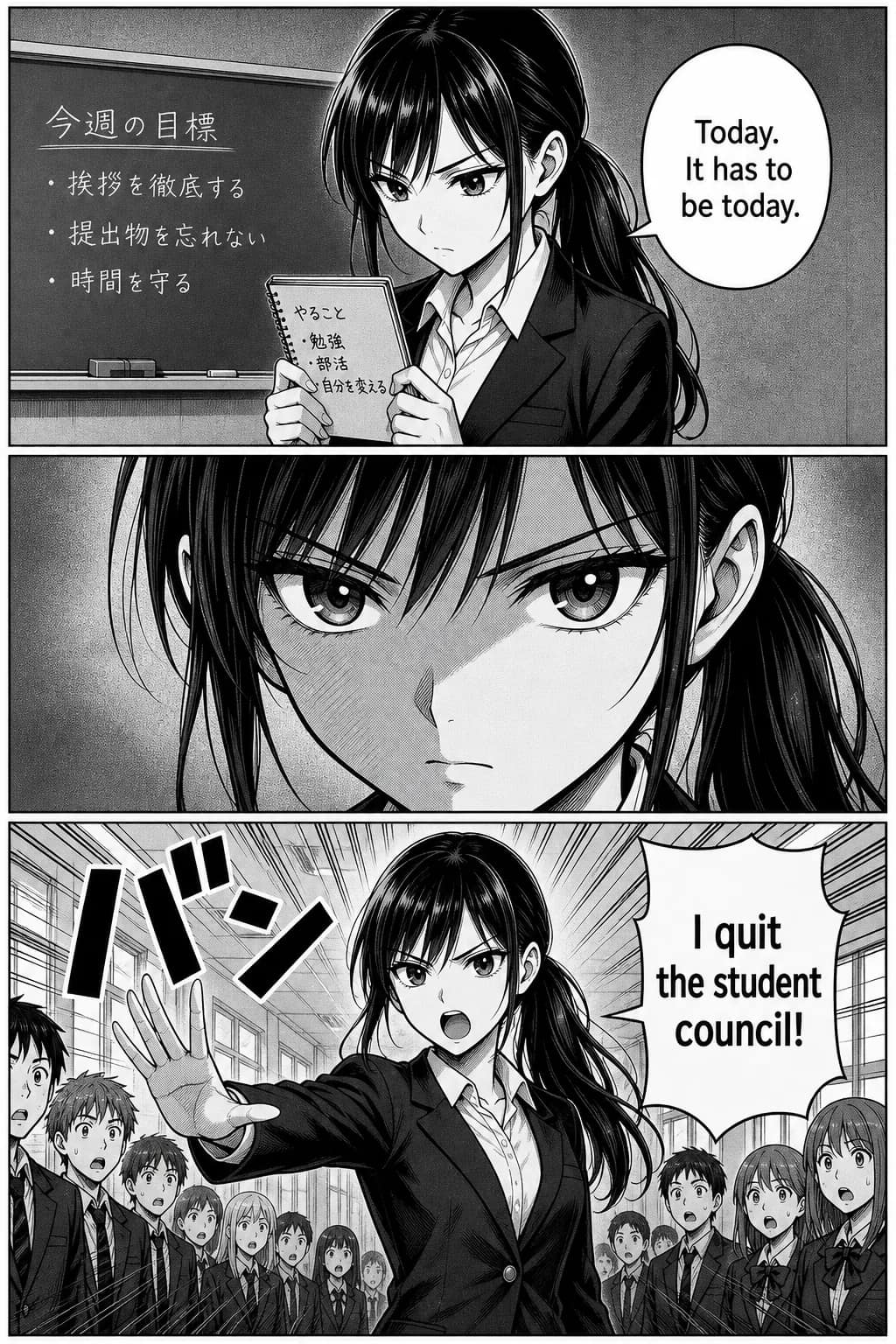
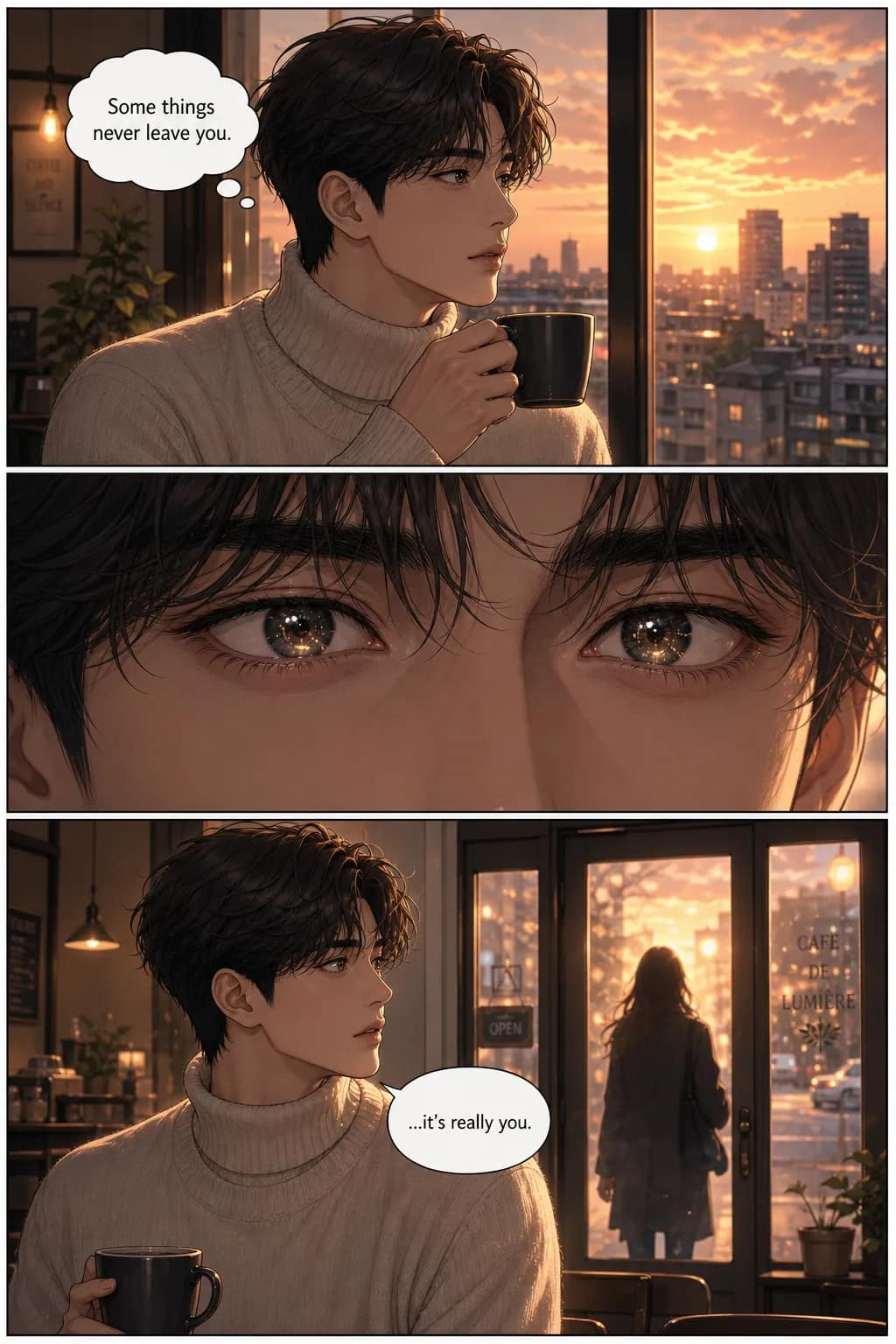
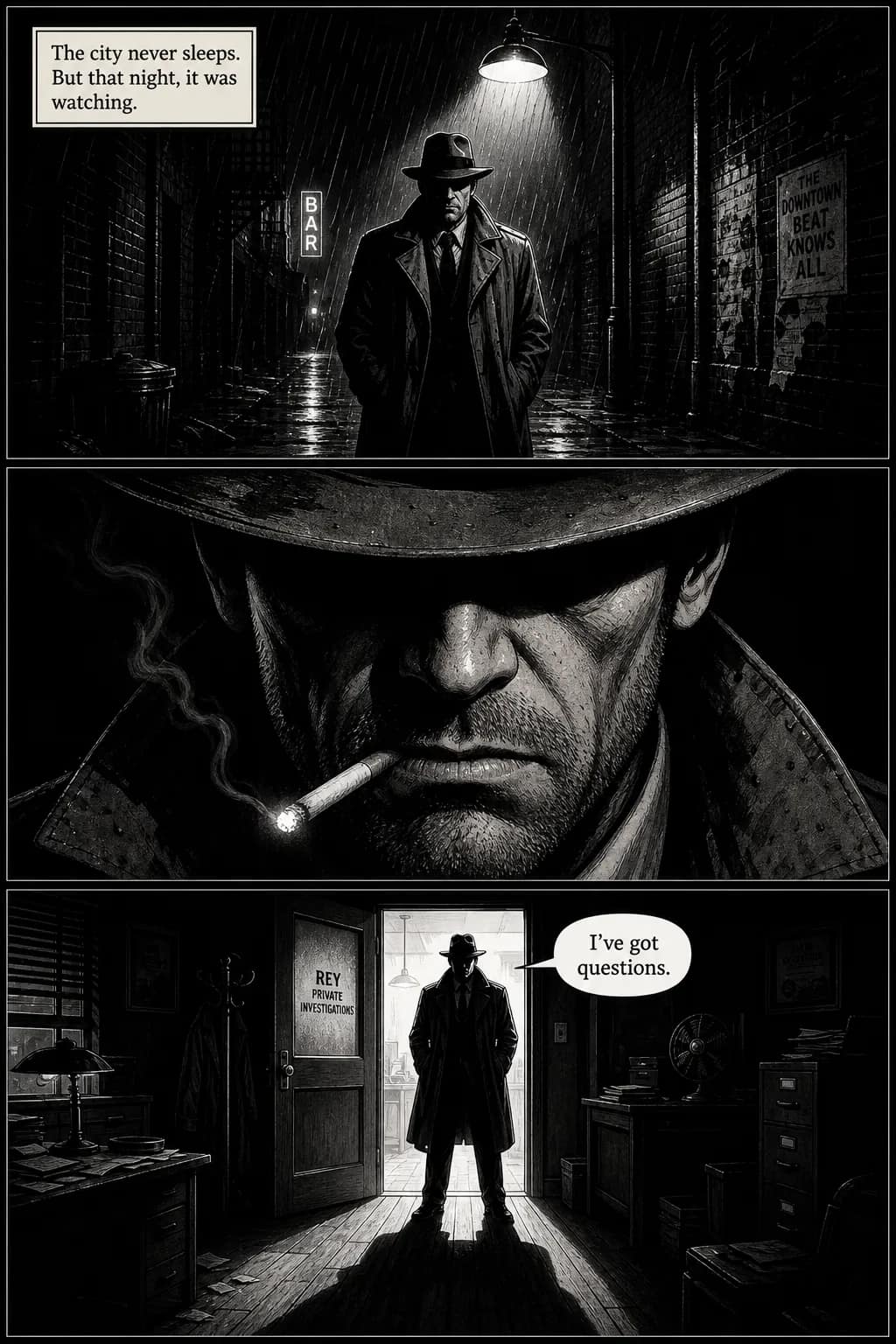
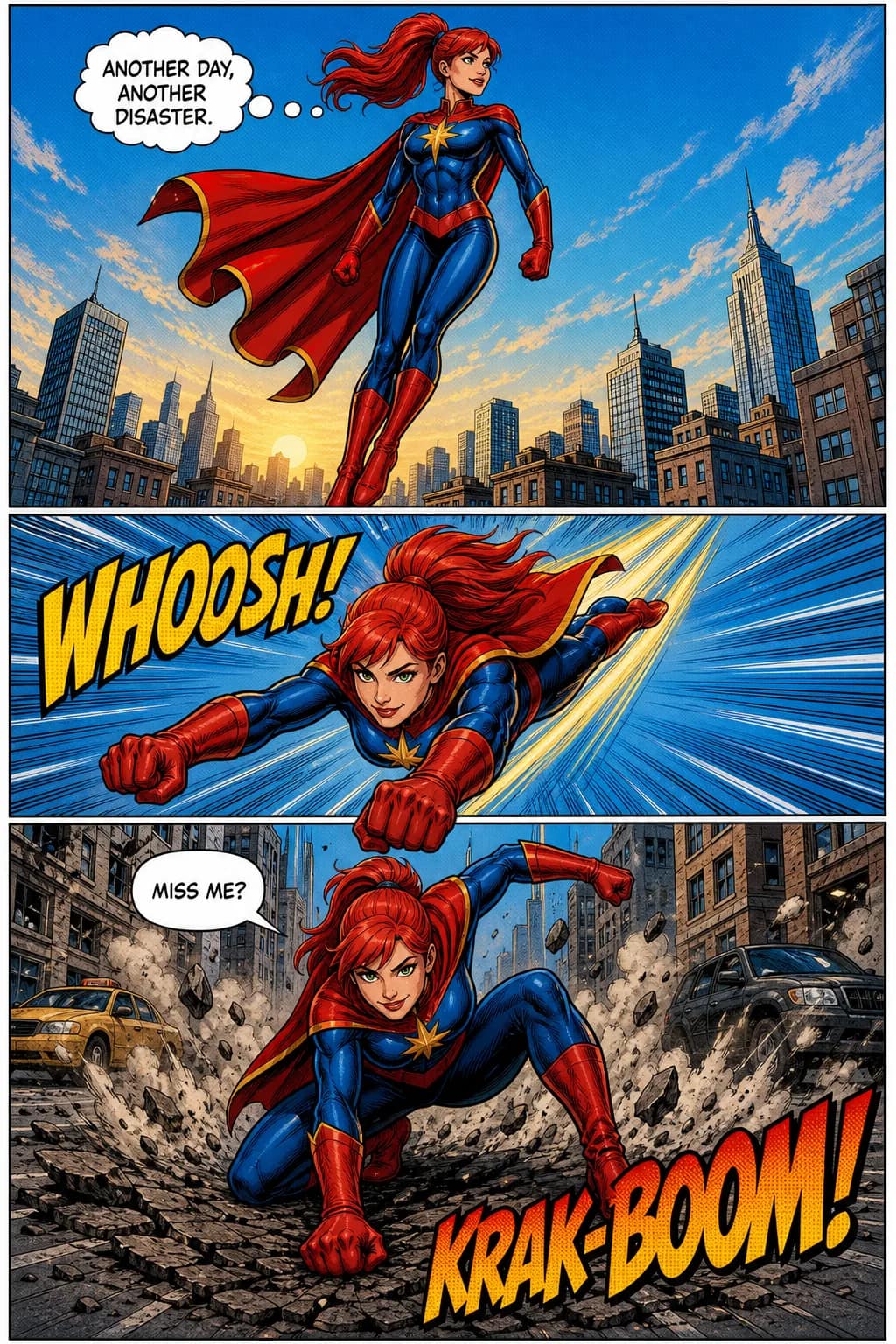
All four generated from the same 3-panel template with different style presets. Character consistency across every panel is built-in — full explanation on the consistent character AI pillar.
Five common template mistakes
Patterns we see across template projects. Avoiding these raises the floor of every comic you make.
- 1
Picking the wrong panel count for your story
Fix: Strips (3-4 panels) = gags or single beats. Pages (6-9 panels) = scenes. Splash = dramatic moments only. Match panel count to story scope before filling the template.
- 2
Ignoring trim margins on print templates
Fix: Comic book printing requires ~0.125" bleed area on all sides. Anything past the trim line gets cut. Most printable templates include trim markers — respect them.
- 3
Mixing strip and page formats in the same project
Fix: A 4-panel strip and a 6-panel page have different reading rhythms. Pick one format per project. For book-length work, stay in page format throughout.
- 4
Using a 9-panel grid for casual storytelling
Fix: The Watchmen grid is dense and demands tight scripting. For everyday work, varied panel sizes work better. Reserve the 9-grid for stories where uniform rhythm is the point.
- 5
Reading-direction conflict in manga templates
Fix: Manga templates are RTL by convention. If you fill an RTL template with LTR-flowing content, the reader gets confused. Pick the template that matches your reading direction.
When you'd reach for a different template source
This guide covers three paths — none of which is TaleAtelier exclusively. Real routing to real third-party sources for the use cases we don't serve.
Drag-and-drop digital customization: Canva (50+ free comic strip templates, free + Pro $15/mo), Edit.org online editor. Drop in stock photos or your own art.
Premium commercial template packs: Etsy (custom-made digital sets $5–$15), Adobe Stock ($9.99/mo or single purchase), Freepik (free + premium tiers).
Pro digital manga work with full control: Clip Studio Paint EX. Industry standard for traditional manga artists. Subscription plans visible from $0.99/month entry-tier on clipstudio.net — verify current EX-tier pricing before subscribing.
Printed blank comic books: Amazon sells pre-printed blank books (Blank Comic Book Pages typically $6–$10) for sketching by hand.
AI comic generator for full stories: Our AI comic generator handles multi-page comic books (4–400 pages) with character consistency across every panel.
AI comic strip specifically: Our comic strip maker handles short-form strips (3–9 panels) with a story-starter ideas library.
Frequently asked questions
- Are these comic book templates free?
- Yes. All thirty-five printable PDFs on this page are free, with no email address and no account — click the Letter or A4 link and the file downloads. Print, photocopy and use them in a classroom without attribution. The separate AI-fill feature, where the tool generates the panel art instead of you drawing it, is a paid subscription (Starter $9.99/mo, Plus $24.99/mo, Pro $59.99/mo). The blank templates cost nothing either way.
- Can AI fill comic book templates with art?
- Yes. TaleAtelier generates complete panel art, characters, and dialogue across 4 tier sizes (Short 4-panel through Custom 400-page). Canva's free AI Comic Generator fills its own templates with AI art (uses Magic Studio credits). Dashtoon Studio generates panels but doesn't impose template structure. For maximum individual panel quality with manual assembly, Midjourney or DALL-E work but require manual composition.
- What's the difference between a comic strip template and a comic page template?
- Strips are short-form — 3-8 panels, single page or social tile, usually setup-conflict-punchline rhythm. Pages are book-format — 4-9 panels per page, designed for sequential pages, varied panel sizes within. A strip lives standalone; a page is part of a sequence. Pick by your project scope: gag or single beat = strip template; story or scene = page template.
- Can I sell prints or merchandise made from these templates?
- Yes for templates you fill yourself with your own art, dialogue, and characters — those rights are yours. For AI-filled work, TaleAtelier grants commercial use on paid plans; Canva grants commercial use within its license terms. US Copyright Office guidance from January 29, 2025 requires human authorship contribution for copyright registration. Read each tool's commercial license before selling; not legal advice.
- Do you need drawing skills to use comic book templates?
- No. Print-and-draw templates suit kids and sketching practice — skills help but aren't required. Digital customize templates (Canva, Edit.org) let you drop in stock images or your own photos. AI-fill (TaleAtelier, Canva AI, Dashtoon) requires no drawing — the AI generates panel art from a brief. Pick the path that matches your skill and time budget.
- How do I print a comic book template at home?
- Download as PDF, open in Acrobat or Preview, print at 100% scale (not 'fit to page' — that distorts proportions). Use US Letter or A4 paper for most templates. For finished work, heavier paper (60–80 lb) gives better feel than standard 20 lb copy paper. For pro printing, export at 300 DPI minimum with bleed area added if printing past the trim line.
- Where can I download blank manga page templates?
- There is one at the top of this page — an irregular-panel manga layout numbered right to left, the order manga is actually read in, in both Letter and A4. Most templates labelled "manga" are western pages with a manga label on them; the reading order is the thing that makes the format. If you want the panels filled rather than blank, our AI manga generator does that directly.
Related guides on TaleAtelier
Comic strip maker — 3–9 panel strip workflow with 15 story-starter ideas.
AI comic generator — long-form comic tool (4–400 pages).
AI manga generator — manga-specific workflow with RTL panel flow.
AI webtoon maker — vertical-scroll webtoon format for WEBTOON Canvas.
Photo to comic — start from a reference photo.
Text to comic — three-tier text input (prompt, story, script).
How to make a comic — the complete comic-making pillar (every format from strip through graphic novel). This templates page is the layout deep-dive.
How to make a webtoon — full webtoon creation guide.
Consistent character AI — pillar page on character consistency.
Sources: picklebums.com, canva.com/comic-strips/templates, edit.org/comic-strips, dadsworksheets.com/charts/comic-strip-template, clipstudio.net/en/purchase, Image Comics + IDW submission guidelines (6.625×10.25″ trim), ISO 216 (A4), Wikipedia (Watchmen by Moore/Gibbons 1986-87), copyright.gov (USCO guidance, January 29, 2025).
Pick your path and go.
Print a blank template from the set above — free, no account. Or if you would rather the panels arrived already filled with character-consistent art, that is what our generator does.
Last reviewed . Third-party template sources and pricing verified same day.