How to make a manga.
Eight stages, once per page, until you have a chapter. Draw on B4 and let the magazine print B5 — not the other way round. And if you are outside Japan: Shueisha takes submissions online now, worldwide.
Those three facts are where most first attempts go wrong, so they are the three this guide gets right first. Sizes and setup, then the eight stages with what each one produces, then how work actually reaches an editor.
Last reviewed . Manuscript dimensions verified against Clip Studio Paint’s manuscript documentation and the Tezuka Award specification; submission requirements against the publishers’ own platforms. Hour estimates are creator-reported from public r/mangamakers discussion and labelled as such — not measured data.
By the TaleAtelier Editorial Team
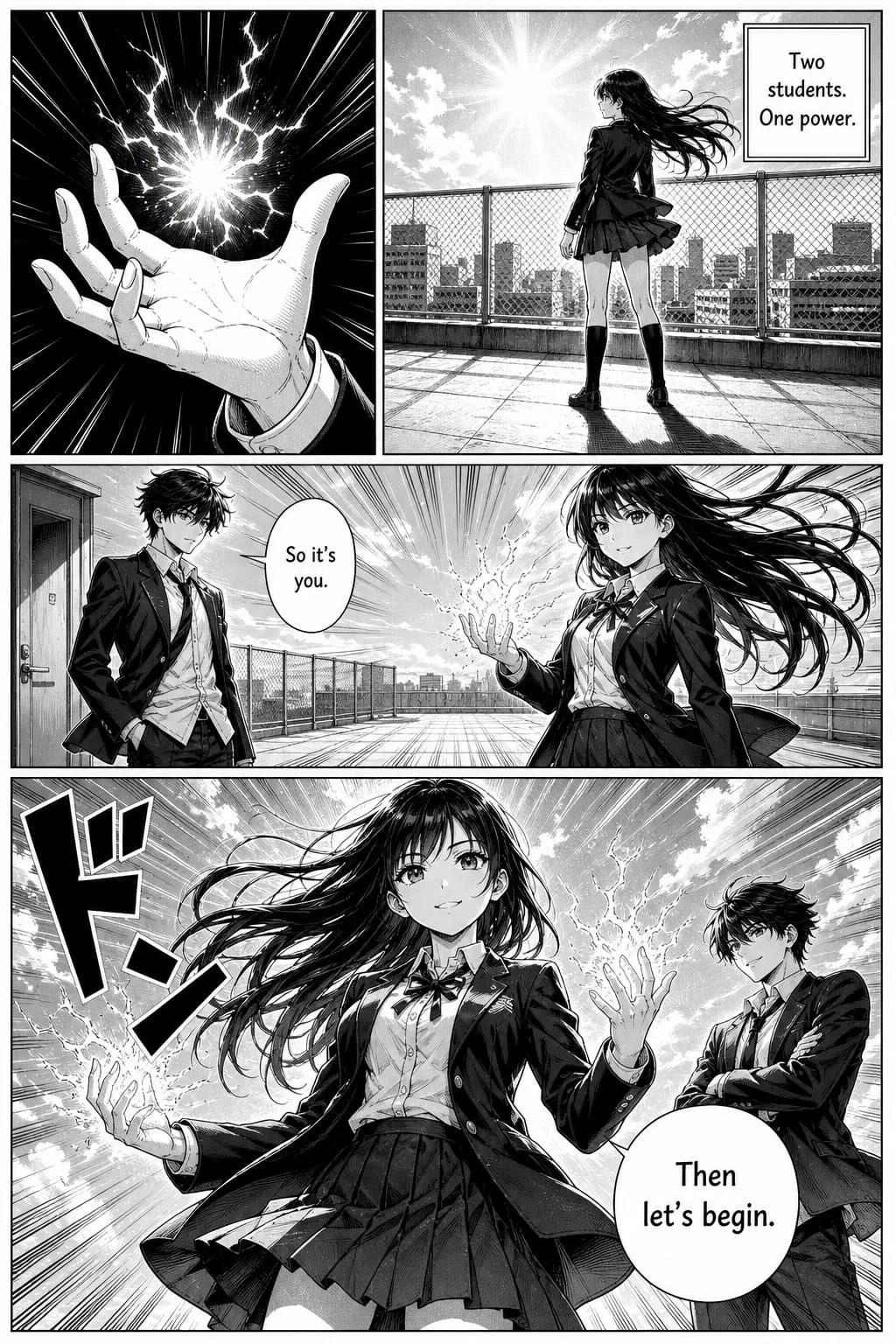
Generated with TaleAtelier — shown here as an example of the finished page format, not of submission-resolution artwork. The difference is covered below.
Making a manga is eight stages repeated per page: concept, characters, script, ネーム thumbnails, pencils, inks, screentones, lettering. Draw on B4 (257 × 364 mm) at 600–1200 dpi for monochrome; magazines print that at B5 and collected volumes at B6. Keep essential art inside the 180 × 270 mm inner frame. A first chapter is 18–24 pages weekly, 31 for a Tezuka Award one-shot. Submission no longer requires being in Japan: Shueisha’s MANGA Plus Creators accepts up to 100 pages online, worldwide.
Page size and manuscript setup
This is the one decision you cannot fix later. Panels, lettering and tone are all drawn relative to the page, so a page set up at the wrong size has to be redrawn rather than rescaled — enlarging line art softens every stroke, and screentone dots moiré when resampled.
The rule: you draw larger than the book prints. Manga manuscript paper is one size up from the finished page. Clip Studio Paint’s manuscript documentation states it as a family swap — for a finished size in the B family, draw one size larger from the A family; for a finished size in the A family, draw the same number in B. Drawing at final size is the most common setup mistake, and it costs you the detail that survives printing.
| Stage | Size | What it means |
|---|---|---|
| What you draw on | B4 — 257 × 364 mm | The Weekly Shōnen Jump and Tezuka Award standard. Accepted range for award submission: 330–365 mm tall × 230–260 mm wide. |
| Magazine / serialization print | B5 — 182 × 257 mm | What the chapter is printed at. One size down from your B4 original. |
| Tankōbon volume print | B6 — 128 × 182 mm | The collected volume you buy in a shop. Smaller than the magazine, which is why fine detail and small lettering vanish if you draw at final size. |
| Doujinshi / self-published | A5 finished, drawn on B5 | Same rule, one family over: A-family finished size means drawing on the same-number B size. |
Working-size rule from Clip Studio Paint’s manuscript documentation; B4 submission range from the Tezuka Award specification. Verified .
The three boundaries on every page
Manuscript paper is pre-printed with three nested rectangles, and knowing which is which is the difference between art that survives the trim and art that gets cut off. From the inside out:
| Boundary | Size | What goes there |
|---|---|---|
| Inner frame (safe area) | 180 × 270 mm | Everything that must survive printing goes inside this: faces, dialogue, anything load-bearing. Art outside it may be trimmed away. |
| Bleed / outer frame | 220 × 310 mm | How far to extend art that runs off the edge of the page. Stop short of this and you risk a white sliver at the paper's edge. |
| Paper (B4) | 257 × 364 mm | The physical sheet. The margin outside the bleed is handling room — registration marks, notes to the editor. |
Frame dimensions from the Tezuka Award manuscript specification (reference frame 270 × 180 mm). Verified .
Resolution: 600–1200 dpi for monochrome, 300–600 dpi for colour. Monochrome needs the higher figure because pure black line art and screentone dot patterns alias badly at low resolution — 600 dpi at B4 is what award submissions are set up around. If you are publishing to screens only, dpi is print metadata with no effect on rendering; pixel dimensions are what matter there.
A blank manga panel template, two pages
Page 1 is a ruled layout with right-to-left panel order marked, plus title, chapter and page fields. Page 2 is a clean skeleton for planning your own panel divisions. Both carry the print instruction on the sheet itself (“print at 100% scale”) because printing a template scaled-to-fit silently changes every dimension on it.
Right-to-left panel order
Manga reads from the top-right corner, leftward along each row, then down to the next row. The page you would call the first is on the right of the spread, and a book opens from what a Western reader treats as the back.
Inside a panel, balloon position beats balloon size. Readers take the rightmost, topmost balloon first even when a larger one sits beside it. This is the rule most often broken by creators who grew up reading left-to-right, and the damage is invisible to the person who made the page: you know what you meant, so you cannot see the ambiguity. A reader who takes two balloons in the wrong order gets a conversation running backwards and concludes the writing is bad.
One practical test before you ink: hand the thumbnails to someone who reads manga and watch where their finger goes. If they hesitate at any panel boundary, the layout is ambiguous there — and hesitation is the signal, not whether they eventually work it out. If you are publishing a vertical strip instead, none of this applies: scroll order is unambiguous by construction, which is one of the format’s real advantages.
The eight stages
Every manga — weekly chapter, tankōbon, doujinshi, pen-and-paper or fully digital — goes through the same eight stages, once per page. What changes between workflows is the tooling, not the sequence.
Each stage below names what it produces. That matters more than it sounds: the usual reason a first chapter stalls is not difficulty but ambiguity — the creator cannot tell whether a stage is finished, so they keep revising stage 05 instead of starting stage 06. If you can hold the artifact, the stage is done.
- 01
Concept
Produces: One sentence you can say out loud
Not a plot. A premise with a built-in engine: who wants what, and what stands in the way. “A retired swordsmith is asked to forge one last blade for the man who killed his son.” If it takes a paragraph to explain, it will take a volume to tell, and first chapters that begin as volumes get abandoned.
- 02
Characters
Produces: A reference sheet per main character
Front view, three-quarter, and expression row — minimum. The reason is mechanical, not artistic: from stage 05 onward you will draw the same face forty times, and without a sheet to check against, the face drifts. Silhouette-first is the standard discipline: if two characters are indistinguishable as black shapes, readers will confuse them in small panels.
- 03
Script
Produces: Page-by-page breakdown with dialogue
Written per page, not per chapter, because the page is the unit of pacing in a printed comic. A line per panel and the dialogue is enough; most manga scripts are plain prose with page and panel numbers rather than screenplay format. The script section below covers what to decide here.
- 04
ネーム (nēmu) — thumbnails
Produces: Quarter-size rough pages, panels and balloons placed
The rough storyboard: stick figures, panel borders, balloon positions, nothing rendered. This is the stage Western workflows most often skip and Japanese editorial most insists on — it has its own section below. Five to fifteen minutes per page. Redoing a page here costs minutes; redoing it at stage 05 costs hours.
- 05
Pencils
Produces: Full drawn pages, not yet inked
Panel borders ruled, figures and backgrounds constructed, perspective committed. Traditionally drawn in blue pencil, which drops out when scanned as line art. This is the longest stage and the one where the character reference sheets earn their keep.
- 06
Inks
Produces: Final black line art
Line weight is doing narrative work here, not decoration: heavier contours push a figure forward, lighter interior lines let a face read at thumbnail size. Traditional kit is a G-pen for expressive tapering lines and a maru-pen for fine detail. Panel borders get inked first, so a slipped ruler ruins a border rather than a face.
- 07
Screentones
Produces: Pages with tonal value and mood
Patterned dot or line overlays standing in for grey. Traditionally adhesive sheets cut with a blade; digitally, tone layers. Tone density carries emotional register — dense tone reads as pressure or dread, sparse tone as air and calm. This is also the stage that makes black-and-white art look like manga rather than an inked drawing.
- 08
Lettering
Produces: A finished, readable page
Balloons placed in the reading order set out above, tails pointing at speakers, sound effects drawn as part of the art rather than typed over it. Lettering is where a page stops being artwork and becomes something legible, and it is worth as much care as the inks: a balloon covering the face it belongs to wastes the panel it sits in.
The ネーム stage, and why it has a confusing name
A ネーム (nēmu) is the rough storyboard of a manga page. Quarter-size thumbnails: panel borders, stick-figure blocking, balloon placement, dialogue written in. Nothing rendered, nothing inked. It is stage 04 above.
The word is borrowed from the English “name,” which is why searching for it in English tends to return advice about naming characters or Japanese personal names instead. It has nothing to do with naming anything. If you read Japanese tutorials or interviews, ネーム will appear constantly and it always means this stage.
Why it matters more in manga than in Western comics is structural, not stylistic: in the Japanese editorial system the nēmu is a deliverable. The artist sends it to their editor, the editor asks for changes — this beat lands flat, this page turn is wasted, this sequence needs one more panel — and only then does the artist begin pencils. The stage exists because revision is cheapest before rendering, and it is institutionalised because someone other than the artist reads it.
Working alone, you have no editor. The discipline still pays, and the substitute is time: thumbnail the whole chapter, leave it for two days, then read it as a stranger would. Problems that are invisible while you are drawing a page become obvious when you read twenty of them in sequence — a fight that occupies eleven pages, a conversation with no establishing shot, three consecutive pages of identical panel rhythm.
Five to fifteen minutes per page is the normal budget. A page you redo at nēmu stage costs you those minutes. The same page redone after inking costs hours, which is why creators who skip this stage tend to abandon chapters rather than fix them.
Five mistakes that cost you a finished chapter
Each of these is recoverable only by redrawing, which is why they are worth checking before you start rather than after. All five follow from the specifications above.
1. Drawing at final print size
Setting up a B5 or B6 canvas because that is the size of the book. Line art enlarged later goes soft, and tone patterns break up. Draw B4, print smaller.
2. Putting faces and dialogue outside the inner frame
Anything beyond 180 × 270 mm may be trimmed off. Art can extend into the bleed deliberately; a speech balloon cannot. This is the mistake that survives all the way to print and then ruins the page.
3. Working monochrome at colour resolution
300 dpi is a colour figure. Pure black-and-white line art and screentone dots need 600–1200 dpi or they alias, and tone can moiré when printed. If you have already drawn twenty pages at 300 dpi, you cannot fix it by upscaling.
4. Mixing reading directions
Panels laid out right-to-left with balloons ordered left-to-right inside them, or vice versa. The usual cause is drafting on a left-to-right layout and flipping it late: the panels mirror correctly, the balloon order inside them does not, and neither does any text drawn into the art. Decide the direction before the ネーム, not after the inks.
5. Starting with a series instead of a one-shot
A premise that needs a volume to pay off cannot be finished by someone who has not yet finished anything. One completed chapter teaches you all eight stages; three abandoned chapters teach you stages one to four, three times over.
Draw it, hire it, or generate it
Three routes reach a finished chapter. They are not interchangeable, and the honest difference between them is not quality in the abstract — it is what each one can and cannot end in.
Learn to draw it yourself
The long path, and the only one that leads to professional serialization. Expect years, not months — figure construction, perspective, and the specific economy of manga faces are separate skills, each with its own learning curve.
Practice structure matters more than practice volume. Copying a page from a manga you admire teaches you panel decisions you would not have made; drawing one original page a week teaches you finishing. Both beat sporadic sketching. This guide covers making a manga rather than learning to draw one — they are different jobs with different timelines.
Write it and hire an artist
If you can write but not draw, this produces the best hand-drawn result available to you, and it is how a great many comics are made. It costs money per page and it costs coordination — your script has to be clear enough that someone else can draw from it, which in practice means your nēmu has to be legible to a stranger. Rates vary widely by artist and region; we have not surveyed current rates and will not quote a figure we cannot source.
Generate the pages with AI
The fastest route to something readable. You write the scene; the tool composes panels, places dialogue, and holds character appearance across pages. TaleAtelier works this way — it generates whole pages rather than single illustrations, which is the part that matters for comics, and it keeps a cast of up to six consistent across a story.
Where this path stops, with the arithmetic: our comic pages are generated at 1664 × 2496 pixels. A B4 manuscript at 600 dpi is 6071 × 8599 pixels — about 3.6 times the linear resolution, and roughly thirteen times the pixel count. Printed at B4 size, our pages land near 165 dpi. So an AI-generated page is a finished, readable comic you can publish yourself, and it is not a Tezuka Award or Weekly Shōnen Jump submission. No amount of upscaling changes that, because the detail was never drawn.
There is a second, subtler mismatch: our pages are 2:3, while every B-size paper is 1:1.41. A page built to one ratio cannot be placed on the other without either cropping art or leaving a margin, so an AI page is not a drop-in replacement for a manuscript sheet even before resolution enters the argument.
Two further limits worth knowing before you plan around them. Our manga style renders black-and-white with screentone-style shading, but tone density is not a control you can dial per panel the way you can in Clip Studio — you get the look, not the lever. And the free preview caps the cast at two characters; the full editor allows six.
Choose this path if the goal is to tell your story and have people read it. Choose the drawing path if the goal is to be serialized. Try the AI manga generator or read how character consistency is handled across pages.
Art style and delivery format are separate choices
These words get used interchangeably and they are not the same axis, which causes real confusion when people plan a project.
Art style is how the drawing looks. Manga is monochrome ink with screentones. Manhwa — Korean — is typically full colour with soft lighting. Manhua — Chinese — leans painterly. These are visual traditions, and you can draw in any of them regardless of where you live.
Delivery format is the shape the reader receives. A page format is a bounded rectangle read as a spread, with the page turn as a dramatic beat. A vertical strip — the webtoon format — is one continuous column sized for phone scrolling, with no page turns and scroll distance as the pacing tool.
The two combine freely. Monochrome manga art delivered as a vertical strip is a normal, published thing. So is full-colour manhwa-style art printed as pages. When someone says “I want to make a webtoon,” they have specified the format and said nothing about the art; when they say “manga,” they usually mean both at once, which is where the conflation comes from.
Demographic register is a third axis, and the one most guides skip. Shōnen, shōjo, seinen and josei are magazine readerships rather than genres — but each evolved a drawing craft you can name, and a reader recognises the register before they read a word.
Shōnen is built for momentum: a bold G-pen contour, large areas of spotted black, radial focus lines converging on the impact, and the double-page spread saved for the one decisive beat. Shōjo inverts nearly all of it — a fine hairline that barely varies, pages dominated by reserved white, panels that overlap and break their borders to let a feeling run past the frame, star highlights in oversized irises, screentone used as emotion rather than shadow. Both are monochrome ink and screentone; almost nothing else about the page construction matches.
Seinen drops the stylisation for real adult proportion and cross-hatched weight. Gekiga goes further still — the postwar dramatic tradition Yoshihiro Tatsumi named in 1957, where dense crosshatching sits over tone, faces are deliberately un-idealised, and the light comes from a practical source in the scene. Iyashikei, the healing register, does the opposite of all of them: low contrast, a scratchy unhurried line, and the setting rather than the faces carrying the feeling.
Worth knowing because the register decides your panel logic before you draw a single frame. A shōnen page and a shōjo page telling the same scene will not share a layout. On TaleAtelier these are six separate presets — classic manga, shōnen, shōjo, seinen, gekiga and slice of life — so the register is a choice you make rather than something you approximate; see the style browser for all six.
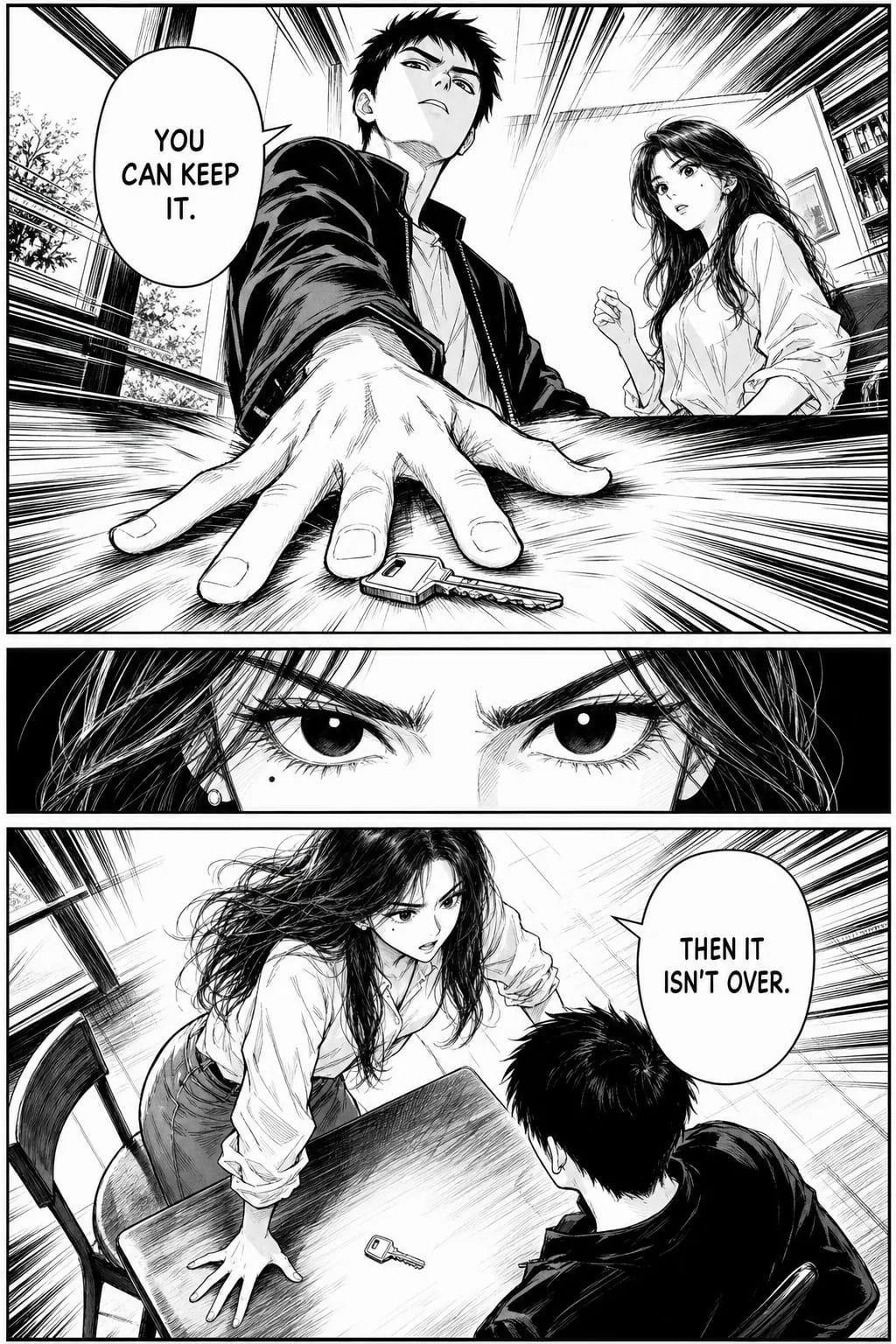
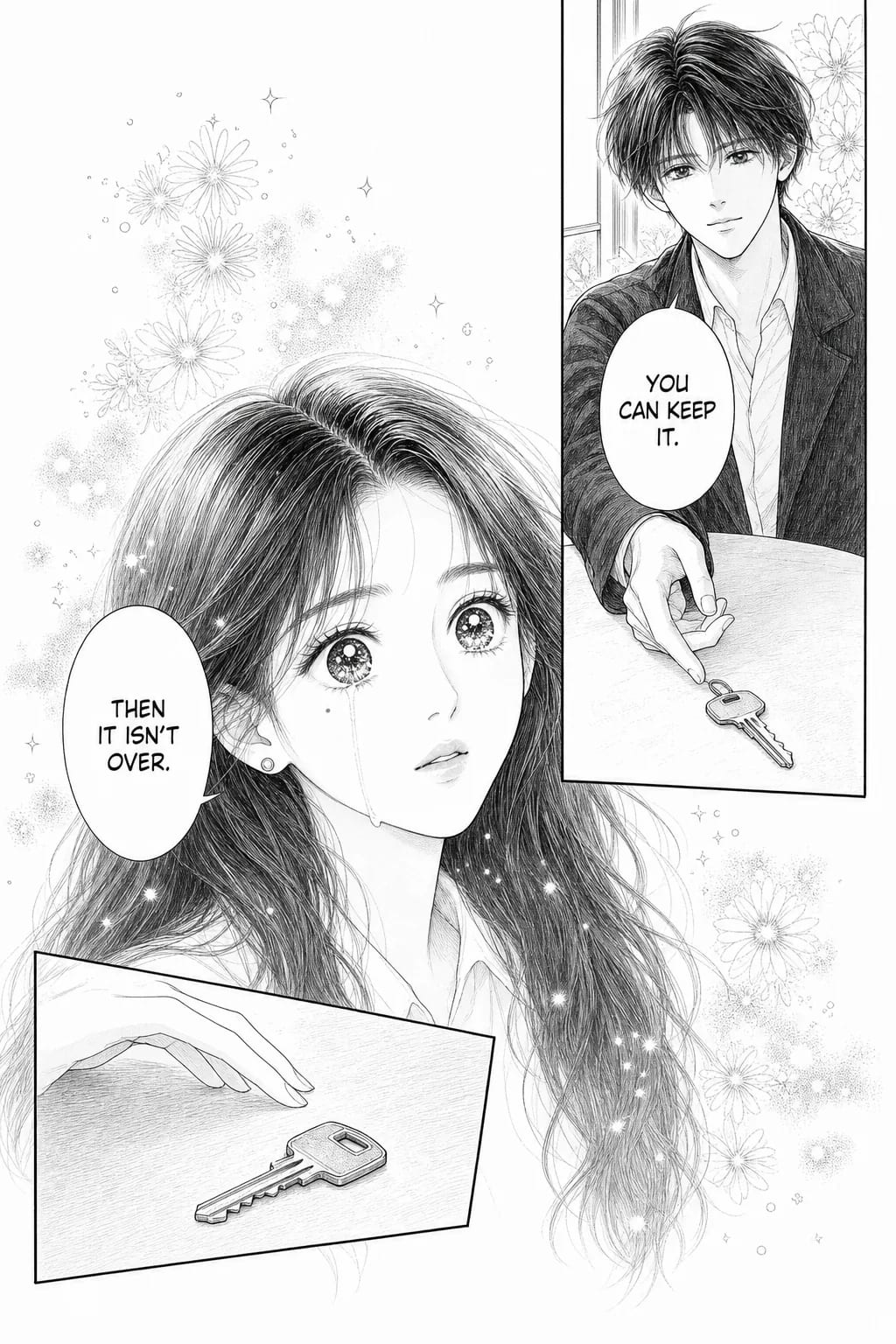
Practically: decide the format first, because it changes your canvas and your panel logic, then choose the style. Manga vs manhwa vs manhua covers the visual traditions in detail, and how to make a webtoon covers vertical-strip production, which differs from this guide at the layout stage onward.
Writing the script
There is no industry-standard manga script format the way there is for screenplays. What matters is that the script is broken down by page, because the page — not the chapter, not the scene — is the unit of pacing in a printed comic.
A workable minimum per page: the page number, a line per panel describing what is seen, and the dialogue. Prose is fine. What you are deciding at this stage is panel count and what lands on the turn, and both of those are page decisions.
The page turn is your only guaranteed dramatic beat. In a printed manga the reader sees two facing pages at once, so anything on the right-hand page is visible early — but what comes after the turn is genuinely hidden. That makes the last panel before a turn the natural place for a question and the first panel after it the natural place for an answer or a reveal. Mark your turns in the script; if a reveal lands mid-spread, move it.
Panel counts are a pacing dial, not a quota. Six to eight panels is a common page average, but the useful figure is relative: a page with two panels reads slowly and feels weighty, a page with ten reads fast and feels frantic. Consecutive pages with identical panel counts read as monotonous regardless of what happens in them.
Dialogue should be written assuming it will be read inside a balloon that takes up part of the panel. Long speeches force large balloons, large balloons cover art, and covered art is why the panel existed. If a line does not fit in three short balloons, it is usually two lines of dialogue and one piece of art doing the rest.
How long is a manga chapter?
A weekly serialized chapter runs 18–24 pages. A monthly chapter runs 30–45. A collected tankōbon volume gathers 6–10 chapters into 180–240 pages. A competition one-shot is 31 pages, which is the Tezuka Award requirement for story manga.
| Unit | Pages | Time | Notes |
|---|---|---|---|
| Weekly chapter | 18–24 pages | 3–5 days with assistants | The Weekly Shōnen Jump cadence. Effectively impossible solo at this rate. |
| Monthly chapter | 30–45 pages | — | More pages, four times the calendar. The usual target for a serious solo creator. |
| One-shot (read-once) | 31 pages | 40–200 hours solo, creator-reported | The Tezuka Award's required length for story manga. A defensible first target. |
| Tankōbon volume | 180–240 pages / 6–10 chapters | 4–12 months solo, creator-reported | The collected book. Not a first project. |
Page counts are publishing convention; the one-shot length is the Tezuka Award specification. Hour figures are creator-reported from public r/mangamakers discussion and are not measured data — the range is wide because inking and tone speed vary enormously with experience.
The weekly figure deserves a caveat, because it is the one people anchor on. A weekly 18-page chapter produced in three to five days is an assisted output: the named mangaka draws key art while assistants handle backgrounds, tone and finishing. Treating it as a solo benchmark is how first projects turn into burnout. If you are working alone, the monthly cadence is the realistic model, and a single one-shot is the realistic first target.
Tools, and what actually distinguishes them
Manga has specific tooling needs that general illustration software does not cover: panel division, screentone libraries built for print halftone, multi-page project management, and right-to-left page order. That is the axis to judge on — not brush feel, which is where most comparisons stop.
Clip Studio Paint
The application Japanese manga tutorials and publisher documentation are generally written around, which makes it the path of least friction if you are following Japanese-language instruction. It has dedicated panel division tools, an extensive screentone library built for print halftone, and multi-page project handling. The EX tier adds the multi-page features; PRO is single-page. Sold both as a subscription and as a one-time perpetual licence.
Krita
The most full-featured free option, open source, with no tier restrictions. It is a general painting application rather than a comics application — no panel divider, a thinner tone workflow — so you build manga conventions yourself using pattern layers.
MediBang Paint
Free, and unlike Krita it ships manga-specific features: panel tools, tone assets, multi-page projects, cloud sync between desktop and mobile. The trade-off is a smaller brush engine and an account requirement for the cloud features.
Procreate
iPad only, one-time purchase, widely liked for how it feels to draw in. Weakest of these on manga-specific tooling — no panel divider, no page management — so it suits drawing practice and single illustrations better than producing a chapter.
Prices deliberately omitted. Clip Studio’s pricing page renders its figures via JavaScript and third-party aggregators disagreed with each other when we checked on , so any number we printed here would be a guess with a citation attached to it. Check the vendors directly — these change, and the tier structure matters more than the headline figure.
Getting it published
You do not need to live in Japan, speak Japanese, or mail anything. Shueisha — the publisher of Weekly Shōnen Jump — runs MANGA Plus Creators, an online submission platform open to creators worldwide. Uploads go through a web or app dashboard: up to 100 pages per work, jpg or png, 5 MB per file. Submissions are judged monthly by Shueisha’s editorial department in Japan, and the Gold award carries a ¥1,000,000 prize.
That is worth stating plainly because the assumption that Japanese publishers are closed to outsiders is both common and out of date — and it stops people finishing work. An earlier version of this page said submission required mailing manuscripts to Japanese editorial offices. That was wrong, and it is the kind of wrong that discourages exactly the reader this guide is for. There are four practical routes, and they are not ranked — they suit different goals.
1. Japanese publisher platforms
Shueisha’s MANGA Plus Creators as above. Kodansha runs parallel routes through its Manga Academy and Creators’ Lab programmes, generally structured as contest windows with editorial feedback rather than rolling submission. Both are digital. This is the route if the goal is serialization by a Japanese publisher, and it is the one where the 600 dpi manuscript standard actually binds.
2. Competitions
The Tezuka Award (31 pages, story manga) and the Akatsuka Award (gag manga, 15, 19 or 31 pages) are the long-standing Shueisha competitions. A competition is useful even if you do not place: it supplies a page count, a deadline, and a specification, which is three more constraints than most first projects have.
3. Publish it yourself, digitally
WEBTOON Canvas and Tapas host self-published work for free and pay through their own monetisation programmes. Kindle Direct Publishing handles print-on-demand paperback and digital. This route has no gatekeeper and no resolution requirement beyond looking good on a screen, which is why it is the realistic destination for AI-assisted and hobbyist work.
4. Print it yourself
Doujinshi culture is built on this: short print runs sold directly, at conventions or online, with crowdfunding covering the print bill. A5 finished on B5 manuscript is the usual doujinshi geometry. You keep everything and you handle everything.
Submission requirements verified against the publishers’ own platforms on . Programmes, prize amounts and contest windows change — check the platform before you build a plan around a deadline. We could not retrieve MANGA Plus Creators’ pixel-dimension requirements, which sit behind the submission dashboard rather than on the public guidelines page.
Your first one-shot
Write a one-shot. Ship it. Then start series work with the lessons from a finished chapter instead of the theory from an unfinished one.
A concrete first project, using everything above: a self-contained story in 16 pages — shorter than the 31-page competition length, because the goal of the first one is completion, not submission. One protagonist, one antagonist or obstacle, one location. A cast of two means two reference sheets, and two faces you can learn to draw consistently rather than six you cannot.
Set up B4 at 600 dpi, download the template, and thumbnail all sixteen pages before drawing a single finished one. Expect the nēmu to take an afternoon and to change the story — that is the stage working correctly, not a setback.
Then draw them in order and do not go back. The temptation to redraw page 3 after your hand improves on page 11 is the single most reliable way to never finish. Page 3 being worse than page 11 is evidence the project is working.
If you cannot draw yet and want to know what your story looks like as pages before committing years to learning, generating a draft is a legitimate way to find out — the AI manga generator produces full pages with panels and dialogue placed. Read the resolution limits above first so you know what you are getting: a readable comic, not a submission.
What we could not verify
Three things on this page’s subject that we could not confirm to a standard worth printing. Listing them is more useful than filling the gaps with plausible numbers.
- Software prices. Clip Studio’s own pricing page renders its figures via JavaScript, and third-party aggregators disagreed with each other on both the subscription and perpetual-licence figures. We describe the pricing models instead and link you to the vendors.
- MANGA Plus Creators image dimensions. Page count, file formats and file-size caps are published; required pixel dimensions are not on the public guidelines page and appear only inside the submission dashboard.
- Current freelance artist rates. Per-page rates for hired manga artists vary by region, experience and scope, and we have not run a survey. Any figure we published would be an anecdote presented as a benchmark.
Publisher submission terms, contest windows and software prices are the fastest-moving facts on this page — which is why each is dated individually above rather than under one page-level stamp. An earlier revision of this page carried a single verification date and a submission claim that had gone stale beneath it.
Frequently asked questions
What size should a manga page be?
Draw on B4 (257 × 364 mm). Magazines print the chapter at B5 (182 × 257 mm); collected tankōbon volumes print at B6 (128 × 182 mm). Keep everything essential inside the 180 × 270 mm inner frame and extend bleed art to 220 × 310 mm. For monochrome line art, work at 600–1200 dpi — 600 dpi at B4 is the figure award submissions are set up around. Self-published A5 doujinshi follows the same logic one paper family over: draw on B5.
Can a non-Japanese person make and submit manga?
Yes, and you do not need to be in Japan or write Japanese. Shueisha runs MANGA Plus Creators, an online submission platform open worldwide: you upload through a web or app dashboard, up to 100 pages per work, jpg or png, 5 MB per file. Submissions are judged monthly by Shueisha's editorial department in Japan and the Gold award carries a ¥1,000,000 prize. Kodansha runs parallel digital routes through its Manga Academy and Creators' Lab programmes. Verified against the platforms' own pages on September 27, 2026.
What is a ネーム (nēmu)?
The rough storyboard stage — quarter-size thumbnail pages with panel borders, stick-figure blocking, and balloon placement, drawn before any finished art. The word is borrowed from English “name,” which makes it easy to search for and get answers about Japanese personal names instead. It has nothing to do with naming characters. Japanese editors review the nēmu and request changes before the artist begins pencils, which is why the stage is treated as a deliverable rather than private planning.
Do I need to know how to draw to make a manga?
Three routes exist and they are not equivalent. Learning to draw is a multi-year path and the only one that leads to professional serialization. Hiring an artist while you write costs money per page and produces the best hand-drawn result if you have budget. AI-assisted tools including TaleAtelier generate finished pages from a written scene and are the fastest route to a readable comic — but see the resolution arithmetic in the production-paths section: AI page output is not at submission resolution, so it is a route to publishing your own work, not to a Jump submission.
How long should my first manga be?
One chapter, and finish it. The Tezuka Award asks for 31 pages for story manga, which makes it a defensible target with an external deadline attached. Creator-reported figures from public r/mangamakers discussion put a solo 20-page chapter at roughly 40–200 hours across all eight stages — a wide range because inking and tone speed vary enormously with experience. Plan a one-shot before a series: an unfinished series teaches you less than one finished chapter.
What resolution and DPI should I work at?
600–1200 dpi for monochrome manga; 300–600 dpi if you are working in colour. The difference is not arbitrary — pure black-and-white line art and screentone dot patterns alias badly at low resolution, and tone moiré on press is a real failure mode. If you are publishing digitally only, dpi is print metadata with no effect on screen rendering; pixel dimensions are what matter there.
Is manga the same as webtoon?
No, and the distinction is worth keeping straight because the words get used interchangeably. Manga is a page format read right-to-left, typically monochrome with screentones. Webtoon is a delivery format — a continuous vertical strip sized for phone scrolling, usually in colour, with no page turns. Manhwa and manhua are Korean and Chinese comics respectively, each with their own visual conventions. A story can be drawn in a manga art style and delivered as a vertical strip; the art style and the format are independent choices.
Related guides on TaleAtelier
How to make a webtoon — vertical-strip production, which diverges from this guide at the layout stage: no page turns, scroll distance as the pacing tool.
How to make a comic — the Western equivalent, with its own trim conventions and left-to-right panel order.
Manga vs manhwa vs manhua — the three traditions compared, including the demographic categories (shōnen, shōjo, seinen, josei) and what they actually signal.
What is a manhua — Chinese comics specifically, if the painterly wuxia and xianxia look is what you are after.
The manga art style — screentones, linework and panel conventions, with examples.
Photo to manga — turning a reference photograph into a manga-style character, useful for building a cast that stays consistent.
Cara membuat komik — termasuk cara membuat manga dan webtoon di HP dengan atau tanpa AI.
日本語版もあります: 漫画の作り方 — 完全ガイド · 写真からイラスト・アニメ化するなら 写真をイラスト化 もどうぞ。
Sources: Clip Studio Paint manuscript documentation (working-size rule, resolution guidance); Tezuka Award manuscript specification (B4 dimensions, inner frame, bleed, page counts); Shueisha MANGA Plus Creators platform pages and FAQ (submission terms, page and file limits, award prize); Kodansha Manga Academy (contest routes); WEBTOON Canvas and Kindle Direct Publishing (self-publishing routes); r/mangamakers public discussion (hour estimates, cited as creator-reported). Individual verification dates appear beside the claims they support.
Set up B4. Thumbnail sixteen pages.
The template is free and needs no email. Print it at 100% scale, or use it as a reference for your digital canvas.
By the TaleAtelier Editorial Team —