Anime Style for AI Comics: Cel Shading, Screentones, Speed Lines
By the TaleAtelier Editorial Team — last reviewed
TL;DR
This page covers the anime aesthetic — cel shading, screentones, speed lines, panel rhythm — and how TaleAtelier bakes those conventions into anime comics. Related styles: Manga (monochrome) and Manhwa (Korean vertical). Monthly plans from $9.99. Want yourself as the anime character? Start from a photo →
The style
One sample panel — the visual language of Anime rendered by TaleAtelier. Line weight, palette, and composition conventions all baked into the discipline.
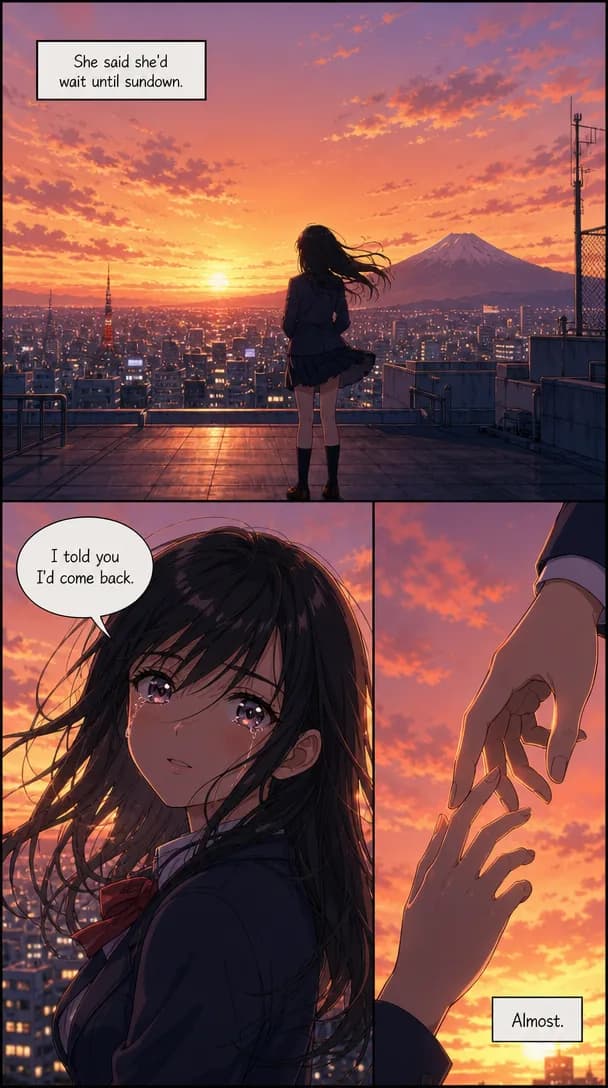
Start with our AI comic generator and pick Anime as your discipline.
How to make an anime comic on TaleAtelier
Five steps, roughly 30 minutes for a 10-panel Short comic.
- 1
Sign up (free account)
2-3 minCreate a free account. Save characters and drafts. Pick a plan when you're ready to generate — enough to test the anime style end-to-end.
- 2
Pick the Anime style
1 minIn the style picker, choose Anime. This locks the whole comic to cel shading, expressive eyes, screentones, and speed lines. Different from Manga (Japanese, monochrome-lean) and Manhwa (Korean, cinematic color).
- 3
Describe your main character (locked)
3-5 minUpload a reference photo or describe the character in text. TaleAtelier stores a character fingerprint and reuses it across every panel — the same face, hair, and outfit. You can track up to 6 characters.
- 4
Write the story brief
5-10 minWrite your plot in 3-5 sentences per act, or paste an existing script. TaleAtelier splits it into panels using story-beat structure (setup → rising action → climax → resolution).
- 5
Generate and refine
10-20 min for 10 panelsHit generate. The generator renders each panel with your locked character and Anime style. Regenerate individual panels if a pose or expression misses.
What makes anime look anime — the visual conventions we bake in
“Anime style” isn't one thing. It's a bundle of visual conventions that developed in Japanese animation from the 1960s onward — mostly to solve production speed problems that then hardened into aesthetic language. When you pick Anime on TaleAtelier, we bake in these conventions:
- Cel shading. Flat color blocks with hard-edged shadow shapes instead of soft gradients. Originated from limited-animation budgets and became the anime look.
- Screentones for emotion. Dot patterns on cheeks (blush), diagonal hatching on shadows, sparkle overlays on eyes. Adapted from manga print.
- Speed lines. Radial or parallel lines that don't exist in physical reality but read instantly as motion. Anime's single most portable convention.
- Big-emotion panels. Chibi-style deformation for comedy, extreme close-ups for drama. Anime lets a character shift proportions between panels without breaking the reader's trust.
- Panel rhythm. Alternating wide establishing shots with tight character close-ups. Different from Western comics which favor consistent panel geometry.
Reference: Scott McCloud, Understanding Comics (1993), chapter 4; Frederik L. Schodt, Manga! Manga! The World of Japanese Comics (1983). Verified .
Anime vs Manga vs Manhwa
These get confused constantly. Short version: anime is an aesthetic, manga and manhwa are formats (Japanese and Korean). You can render a manga in an anime aesthetic but not vice versa.
| Dimension | Anime | Manga | Manhwa |
|---|---|---|---|
| Country | Japan (aesthetic) | Japan | Korea |
| Color | Full color, cel-shaded | Black & white + screentones | Full color, cinematic |
| Reading direction | Any (it's a look, not a format) | Right-to-left | Top-to-bottom (vertical scroll) |
| Canonical works | Neon Genesis Evangelion, One Piece animation | One Piece, Naruto, Attack on Titan | Solo Leveling, Tower of God, Lore Olympus |
| Best on TaleAtelier for | Emotional character stories, action beats | B&W action manga, monochrome atmosphere | Full-color webtoon, vertical scroll |
Verified .
Anime prompt patterns that work
Vague prompts (“anime girl in Tokyo”) get generic output. Specific prompts (named character + named emotion + named technique) get panels you actually want to use.
Emotional close-up
Works because it's specific: named character (locked), specific emotion, specific visual technique (screentones for blush).
Action beat with speed lines
Speed lines are the anime language for motion. Named angle (low) fixes composition.
Establishing shot with atmosphere
Establishing shots are hard because AI wants to zoom on characters. 'Wide shot' + 'small silhouette' forces it.
When to reach for another tool (honest)
TaleAtelier is a comic tool. It's not the fastest option for every anime-adjacent job. Here's where we'd honestly send you elsewhere:
- Single anime avatar or profile picture → NovelAI is faster and cheaper. It's optimized for one image at a time with heavy stylistic control. TaleAtelier would be overkill.
- One-off stylized anime portrait → Adobe Firefly if you already pay for Creative Cloud. Free tier is generous.
- Anime comic story with returning characters → TaleAtelier. This is what we're actually built for.
FAQ
Last reviewed:
Is TaleAtelier an anime art generator or an anime comic generator?+
Comic. If you want a single anime avatar or one anime portrait, tools like NovelAI, Adobe Firefly, or Perchance are faster and free. TaleAtelier is built for anime sequential storytelling — multiple panels with the same character across each one, story beats, dialogue bubbles.
How does TaleAtelier keep the same anime character across every panel?+
When you upload a reference photo or describe a character, TaleAtelier stores a character fingerprint (facial structure, proportions, hair, outfit) and reuses it on every panel generation. It's not perfect on tier-1 subtle features (eye color shift, hair-tie details), but the face and outfit stay consistent across 20+ panels reliably.
Anime vs manga vs manhwa on TaleAtelier — which do I pick?+
Pick Anime for full-color cel-shaded stories (emotional or action). Pick Manga for black-and-white with screentones (traditional Japanese comic). Pick Manhwa for full-color vertical webtoon. All three are separate style presets — you can't mix them in one comic, so decide upfront.
How many anime panels can I make per month?+
Starter ($9.99/mo, 2,000 coins) covers ~2-3 Short comics per month. Plus ($24.99/mo, 7,000 coins) suits regular publishing. Pro ($59.99/mo, 20,000 coins) is for studios and heavy users. All plans use the same character consistency.
Can I use my own photos as anime character references?+
Yes. Upload a clear photo of your face (or a friend, with permission) and TaleAtelier converts it to an anime interpretation while keeping the underlying facial structure. Works best with front-facing photos in good lighting.
What if my anime panel looks generic or off-model?+
Regenerate that single panel — you don't lose progress on the rest. If it keeps missing, add more specificity to your prompt: name the emotion, name the angle, name the visual technique (screentones, speed lines, cel shading). Vague prompts get generic output.
Ready to make your anime comic?
Monthly plans from $9.99. Cancel anytime.
Create your account