AI Manhwa Generator: Full-Color Vertical Webtoon Comics
By the TaleAtelier Editorial Team — last reviewed
TL;DR
TaleAtelier makes manhwa-style vertical webtoons with locked characters across up to 400 panels. Three K-content-adjacent styles: Manhwa (Korean), Manhua (Chinese), Manga (Japanese). Monthly plans from $9.99. Manhwa = Korean, vertical-scroll, full color, cinematic lighting. Different from Japanese manga (black & white, right-to-left). Have a photo? Turn it into a manhwa featuring you →
Confused about manhwa vs manga vs manhua? See our full three-way comparison guide — etymology, differences, reading direction.
The style
One sample panel — the visual language of Manhwa rendered by TaleAtelier. Line weight, palette, and composition conventions all baked into the discipline.
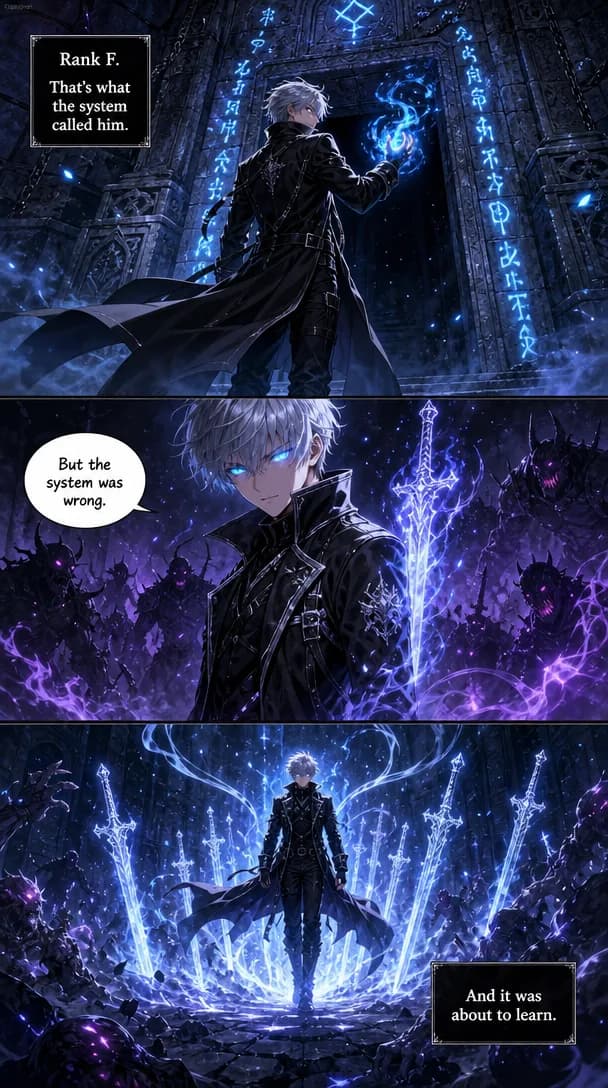
Start with our AI comic generator and pick Manhwa as your discipline.
How to make a manhwa on TaleAtelier
Five steps, ~30 minutes for a 10-panel Short manhwa.
- 1
Sign up (free account)
2-3 minCreate a free account. Save characters and drafts. Pick a plan when you're ready to generate — enough to test the Manhwa style end-to-end.
- 2
Pick the Manhwa style
1 minManhwa is our Korean-webtoon preset: full color, cinematic lighting, vertical panel flow. Different from Manga (Japanese, monochrome) and Manhua (Chinese, martial-arts palette).
- 3
Design your protagonist (locked)
3-5 minUpload a photo or describe your character. TaleAtelier stores a character fingerprint and reuses it across every panel. Track up to 6 characters — enough for a webtoon ensemble.
- 4
Write the story brief
5-10 minPlot in 3-5 sentences per act. TaleAtelier splits into vertical-flow panels. Manhwa panel rhythm favors dramatic close-ups + wide reaction shots.
- 5
Generate and refine
10-20 min for 10 panelsThe generator renders each panel with your locked character and Manhwa cinematic lighting. Regenerate individual panels that miss the color mood.
Manhwa vs Manga vs Manhua vs Webtoon
These four terms are constantly confused. Here's the honest breakdown:
| Dimension | Manhwa | Manga | Manhua | Webtoon |
|---|---|---|---|---|
| Country of origin | Korea 🇰🇷 | Japan 🇯🇵 | China 🇨🇳 | Platform format (Korean origin) |
| Reading direction | Top-to-bottom (vertical scroll) | Right-to-left (traditional) | Left-to-right or vertical | Top-to-bottom (vertical scroll) |
| Color | Full color, cinematic | Black & white + screentones | Full color, saturated | Full color (usually) |
| Format | Digital webtoon, chapter-based | Print magazine + volumes | Print + digital, both formats | Vertical scroll on Naver/Webtoon Canvas |
| Canonical works | Solo Leveling, Tower of God, Lore Olympus | One Piece, Naruto, Attack on Titan | The King's Avatar, Feng Shen Ji | Lore Olympus, True Beauty |
| Best on TaleAtelier for | Full-color vertical stories | B&W ink-heavy stories | Martial arts / historical | Same as Manhwa (use Manhwa style) |
Canonical: Solo Leveling (Chugong, 2016-2018, KakaoPage; art by Jang Sung-rak / DUBU); Tower of God (SIU, 2010+, Naver Webtoon); Lore Olympus (Rachel Smythe, 2018+, Webtoon Canvas). Verified .
Want the full production side — canvas specs, publishing platforms (WEBTOON Canvas / Tapas / Naver / Lezhin), monetization thresholds? See our complete webtoon-creation guide. For CANVAS-vs-Originals contract paths and real Ad Revenue pay numbers, see the webtoon creator career guide.
What makes manhwa look manhwa
Korean webtoons developed distinct visual conventions in the 2000s as mobile-first digital comics on Naver and Daum. When you pick Manhwa on TaleAtelier, we bake in:
- Full color, cinematic lighting. Manhwa is almost never black-and-white — rim lighting, colored ambience, and volumetric light are core to the look.
- Vertical panel flow. Panels are taller than wide, meant to be scrolled top-to-bottom on a phone. Not stacked left-to-right like Western comics.
- Dramatic close-ups. Manhwa uses more extreme close-ups than manga — eyes, tears, glowing effects. Emotional register runs high.
- Chapter cliffhanger frames. Manhwa chapters end on a strong single-panel visual — often a low-angle reveal or high-contrast silhouette.
- Scroll rhythm. White space between panels controls pacing — long gaps for dread, tight stacking for action.
Manhwa prompt patterns that work
Dramatic close-up (manhwa signature)
Manhwa lives on emotional close-ups. Named character + cinematic lighting + vertical composition = manhwa signature.
Action reveal (wide vertical panel)
Named influence (Tower of God) works — the generator has the visual reference. Wide vertical composition is the key manhwa framing.
Chapter cliffhanger
Chapter endings are what manhwa is famous for. Low angle + colored magic aura + dramatic light = cliffhanger frame.
When to reach for another tool (honest)
- Publishing to Naver Webtoon or Webtoon Canvas → those are publishing platforms, not creation tools. Make your manhwa on TaleAtelier, then upload the panels to Webtoon Canvas or Tapas per their format guidelines.
- Photo-to-manhwa filter (one selfie → one manhwa portrait) → tools like FlexClip or Media.io are faster if you just want one stylized selfie. TaleAtelier is overkill.
- Reading existing manhwa → try Webtoon, KakaoPage, or Tapas. Those are reading apps, not creation tools.
- Making your own manhwa with a returning cast → TaleAtelier. Full-color vertical + character consistency is exactly this use case.
FAQ
Last reviewed:
What's the difference between manhwa and webtoon on TaleAtelier?+
Practically none. Manhwa is Korean-origin comics; webtoon is the vertical-scroll digital format that manhwa popularized. On TaleAtelier, picking Manhwa gives you Korean-style full-color vertical panels. If you want to publish on Naver Webtoon or Webtoon Canvas afterward, that's a separate export step.
Manhwa vs manga vs manhua — how do I actually pick?+
Pick Manhwa for Korean full-color vertical stories (Solo Leveling style). Pick Manga for Japanese black-and-white with screentones (One Piece style). Pick Manhua for Chinese full-color with martial-arts/historical framing (The King's Avatar style). All three are visually distinct on TaleAtelier.
Can TaleAtelier generate proper vertical-scroll manhwa panels?+
Yes. When you pick Manhwa style, TaleAtelier uses vertical panel composition (taller than wide) and cinematic full-color lighting. The individual panels are generated at manhwa aspect ratios and can be stacked for vertical scroll reading.
How many manhwa panels does each plan include?+
Starter ($9.99/mo, 2,000 coins) covers ~2-3 Short comics per month. Plus ($24.99/mo, 7,000 coins) suits regular publishing. Pro ($59.99/mo, 20,000 coins) is for studios and heavy users. All plans use the same character consistency.
Can I publish TaleAtelier-generated manhwa on Naver Webtoon or Webtoon Canvas?+
Yes — the panels are yours to use. Naver Webtoon Canvas and Tapas both accept independently-created content. Check each platform's content and format guidelines separately; TaleAtelier doesn't auto-publish anywhere.
Why is manhwa expensive as a keyword? (I heard $14 CPC)+
Advertisers pay more per click for manhwa-tool queries because manhwa readers convert well to paid tools — the audience is engaged, largely mobile-first, and habituated to paying for chapters. That's a market signal, not a pricing statement about TaleAtelier (we're still $9.99 Starter / $59.99 Pro).
Ready to make your manhwa?
Monthly plans from $9.99. Cancel anytime.
Create your account